I am an undergraduate student creating a gui for a project. I have a function that will display a histogram when the user enters the name of that histogram into a text entry field in a dialogue box and a button is pressed. I have a draw function in which there is a line of code:
fFrame->Draw(chain name)
I then enter the chain name into the text entry in the dialogue and press an Ok button. How do I have it such that when I press this button my histogram is displayed?
I have tried a few things and have had no luck.
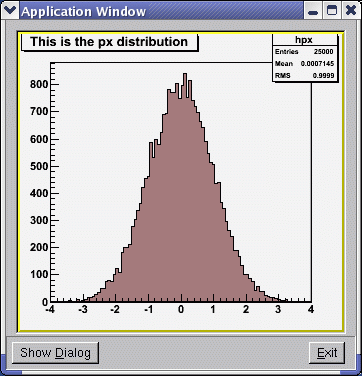
There is an example in the attached file with an main window application and a dialog window via which you can enter one of the both histogram names: hpx, hpxpy. After you hit Enter key, the entered histogram name is shown and you can draw the histogram in the main application window by clicking on the Draw&Close button. Please create and copy the file hsimple.root from $ROOTSYS/tutorials into the directory where you are going to execute this macro. To simplify the code I did not include the code for checking if this file exists; if the histogram names are entered correct ly (i.e. hpx, hpxpy), etc.
Thank you for the macro. I have tried to run it by creating a directory with the macro and the hsimple.C in. When I enter ROOT I type in .x dialogExample2.C and I get the error:
root [0] .x dialogExample2.C
Error: class,struct,union or type MyMainFrame not defined FILE:dialogExample2.C LINE:72
*** Interpreter error recovered ***
I cannot reproduce this case. I have created a new directory, I have copied the macro hsimple.C and the example and everything runs. Please see the attached files.
Could be related with settings of your environment. You can copy the example macro in the $ROOTSYS/tutorials or you can run hsimple.C there and copy the hsimple.root file in the directory of the macro example.
I have got the macro to work and have copied what I see as the revelant code into my class, but when I press the Draw&Close button I get the attached list of errors.
Any ideas as to why?
Does the MainFrame is your main frame application window?
where do you create the MyDialog object?
Please see TGMainFrame and TGTransient Frame classes in the ROOT reference Doc and in the User’s Guide chapter “Writting a GUI”. A pointer to the main frame window should be passed in the dialog constructor. The method TGTransientFrame::GetMain() can be used if you need to use the main frame pointer somewhere.
I have solved my problem, I hadn’t initialised my canvas. However, now, when I type in the name of the histogram chain (data or Monte Carlo) and press the Ok button I get the error:
The Ok button is pressed
Error: Symbol data is not defined in current scope FILE:(tmpfile) LINE:1
Error: Failed to evaluate data->Draw()Possible candidates are…
filename line:size busy function type and name
*** Interpreter error recovered ***
Both myself and my supervisor can’t figure out why, can you help?
I have attached my MainFrame class and executable, useMainFrame.
The example I provided uses the Draw() method that does not seem to be available for the object ‘data’ you want to draw on the canvas. Please read the “Drawing Objects” at: ftp://root.cern.ch/root/doc/Users_Guide_4_08.pdf.
If you list the file contents of “hsimple.root” you will see
root [0] TFile f("hsimple.root")
root [1] f.ls()
TFile**         hsimple.root    Demo ROOT file with histograms
 TFile*         hsimple.root    Demo ROOT file with histograms
  KEY: TH1F     hpx;1   This is the px distribution
  KEY: TH2F     hpxpy;1 py vs px
  KEY: TProfile hprof;1 Profile of pz versus px
  KEY: TNtuple  ntuple;1        Demo ntuple
The Draw() method is available for both: hpx and hpxpy as you can check in the ROOT Reference Guide.
I have been trying to get my histograms displayed using the example that you gave me but I’ve not had much success. No matter what I do I still get an error saying that the symbol is not defined in current scope. Can you help me?
Unlike the example, I do not have previously created histograms.
I have an executable in which I open my analysis root file and read back the analysis. I then have a function in which I read back a chain, get the histograms from that chain, fill the arrays of histograms and add them to a plotter. When I enter the chain name into the text entry and close hte dialog box I want it to work through this sequence and display the histogram.
In your context what is data?
Having the interpreter execute:data->Draw()might be relying on the fact that the ‘proper’ ROOT file is the current directory. In particular that there is an object named ‘data’ stored in the current directory.
If ‘data’ is indeed supposed to come from a file, you might need do cd to it before executing “data->Draw”.
Data is the name of the chain that contains the files of eveny data recorded by the detector. I’m not sure if your suggestion is possible because I have a gui in which I bring up a dialog box and enter the name of the chain that I want to display.