Describe the bug
Cannot create RDataFrame instance using pre-compiled binary distribution of ROOT for Windows.
Expected behavior
Successful creation of RDataFrame instance.
To Reproduce
Launch Visual Studio 2022 Developer Command Prompt.
**********************************************************************
** Visual Studio 2022 Developer Command Prompt v17.14.21
** Copyright (c) 2025 Microsoft Corporation
**********************************************************************

C:\Program Files\Microsoft Visual Studio\2022\Community>cd %userprofile%

C:\Users\user>C:\root\bin\thisroot.bat

C:\Users\user>root -l
root [0] ROOT::RDataFrame d(1);
cling::DynamicLibraryManager::loadLibrary(): LoadLibrary: returned 126:
Error in <AutoloadLibraryMU>: Failed to load library C:\root\bin\libROOTDataFrame.dll[runStaticInitializersOnce]: Failed to materialize symbols: { (main, { $.cling-module-9.__inits.0, __orc_init_func.cling-module-9, ??__Fd@__cling_N50@@YAXXZ, ?d@__cling_N50@@3VRDataFrame@ROOT@@A, _GLOBAL__sub_I_cling_module_9, .weak.??__Ed@__cling_N50@@YAXXZ.default.?d@__cling_N50@@3VRDataFrame@ROOT@@A, .weak.??__Fd@__cling_N50@@YAXXZ.default.?d@__cling_N50@@3VRDataFrame@ROOT@@A, .weak._GLOBAL__sub_I_cling_module_9.default.?d@__cling_N50@@3VRDataFrame@ROOT@@A, ?__cling_Un1Qu30@__cling_N50@@YAXPEAX@Z, ??__Ed@__cling_N50@@YAXXZ }) }
cling::DynamicLibraryManager::loadLibrary(): LoadLibrary: returned 126:
Error in <TCling__LazyFunctionCreatorAutoloadForModule>: Failed to load library C:\root\bin\libROOTDataFrame.dll
cling::DynamicLibraryManager::loadLibrary(): LoadLibrary: returned 126: Ё$
Error in <TCling__LazyFunctionCreatorAutoloadForModule>: Failed to load library C:\root\bin\libROOTDataFrame.dll
IncrementalExecutor::executeFunction: symbol '??0RDataFrame@ROOT@@QEAA@_K@Z' unresolved while linking [cling interface function]!
You are probably missing the definition of public: __cdecl ROOT::RDataFrame::RDataFrame(unsigned __int64) __ptr64
Maybe you need to load the corresponding shared library?
Symbol found in 'C:\root\bin\libROOTDataFrame.dll'; did you mean to load it with '.L C:\root\bin\libROOTDataFrame.dll'?
IncrementalExecutor::executeFunction: symbol '??1RDataFrame@ROOT@@QEAA@XZ' unresolved while linking [cling interface function]!
You are probably missing the definition of public: __cdecl ROOT::RDataFrame::~RDataFrame(void) __ptr64
Maybe you need to load the corresponding shared library?
Symbol found in 'C:\root\bin\libROOTDataFrame.dll'; did you mean to load it with '.L C:\root\bin\libROOTDataFrame.dll'?
Edit: compare with ROOT v6.36.04 installed via dnf on AlmaLinux 9
[user@desktop ~]$ root -l
root [0] ROOT::RDataFrame d(1)
(ROOT::RDataFrame &) An empty data frame that will create 1 entries
Setup
I downloaded pre-compiled binary distribution for Windows Visual Studio 2022 64-bit x64 from Release 63606 - ROOT (root_v6.36.06.win64.python311.vc17.exe) and installed it to C:\root.
ROOT v6.36.06
Built for win64 on Nov 25 2025, 11:53:37
From tags/v6-36-06@v6-36-06
With MSVC 19.39.33521.0
Binary directory: C:\root\bin
Visual Studio Community 2022 17.14.21
Microsoft (R) C/C++ Optimizing Compiler Version 19.44.35221 for x64
Additional context
For some reason C:\root\bin\libROOTDataFrame.dll is not loaded automatically despite calling thisroot.bat.
Otherwise ROOT seems to be working correctly.
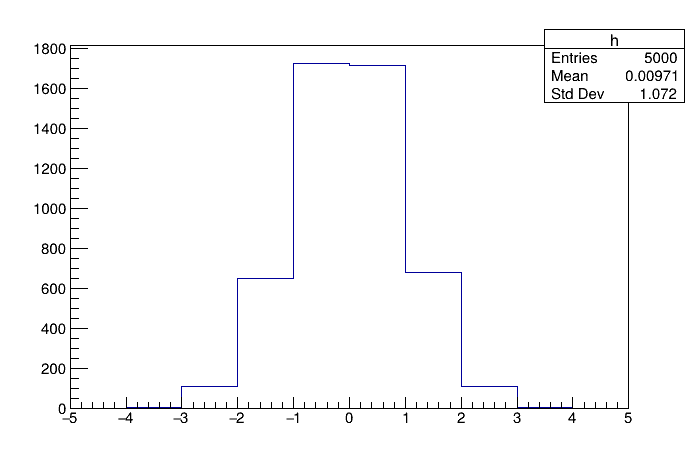
Drawing simple histogram works
**********************************************************************
** Visual Studio 2022 Developer Command Prompt v17.14.21
** Copyright (c) 2025 Microsoft Corporation
**********************************************************************

C:\Program Files\Microsoft Visual Studio\2022\Community>cd %userprofile%

C:\Users\user>C:\root\bin\thisroot.bat

C:\Users\user>root -l
root [0] TH1D h("h", "", 10u, -5.0, 5.0);
root [1] h.FillRandom("gaus");
root [2] h.Draw();
Info in <TCanvas::MakeDefCanvas>:  created default TCanvas with name c1
root [3]