When I attempted to run the GEMGPU program in Ubuntu 24.04 using WSL2, and used the parameter “–gpu”, it displayed the error message “ERROR: Requested GPU usage but Garfield has not been built with GPU support” Avalanche size = 0, 0
Endpoints = 0”
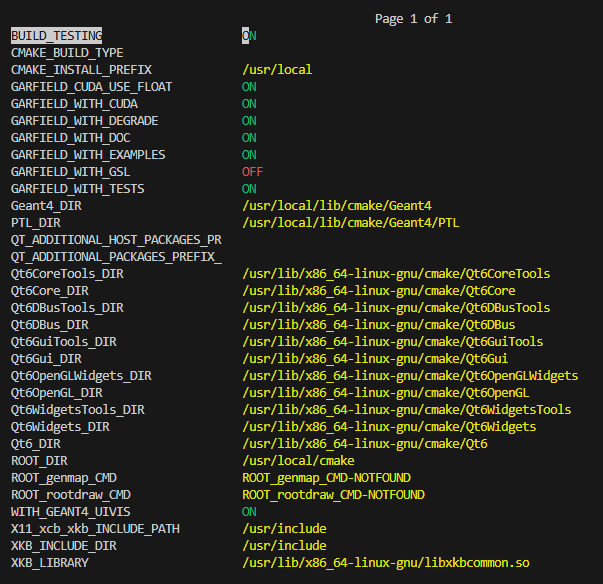
When I was compiling and installing Garfield++, I had set GARFIELD_WITH_CUDA to ON, and successfully completed the compilation and installation. What should I do to make the GPU work?
Hello, during the CMake process, CUDA support was successfully found.
– Looking for a CUDA compiler
– Looking for a CUDA compiler - /usr/local/cuda-13.2/bin/nvcc
– The CUDA compiler identification is NVIDIA 13.2.51
– Detecting CUDA compiler ABI info
– Detecting CUDA compiler ABI info - done
– Check for working CUDA compiler: /usr/local/cuda-13.2/bin/nvcc - skipped
– Detecting CUDA compile features
– Detecting CUDA compile features - done
I thought it was a problem with root6. So I recompiled root6. But when I tried to recompile Garfield++, it gave an error:
fatal error: TMatrixD.h: No such file or directory
fatal error: TRandom3.h: No such file or directory
Recompiling ROOT might have changed its include directories, and it looks to me like CMake is using the wrong directory to find these headers.
Try removing the CMakeCache.txt file from your Garfield build directory before you recompile the project. If that fails, try removing the entire build directory and recreating it from scratch.
Hello, I have tried to delete the entire build folder and then recompile Garfield++, but the same error still persists.
fatal error: TMatrixD.h: No such file or directory
fatal error: TRandom3.h: No such file or directory
make[2]: *** [GPU/CMakeFiles/GarfieldGPU.dir/build.make:77: GPU/CMakeFiles/GarfieldGPU.dir/AvalancheMicroscopicGPU.cu.o] Error 1
make[1]: *** [CMakeFiles/Makefile2:1866: GPU/CMakeFiles/GarfieldGPU.dir/all] Error 2
When I set GARFIELD_WITH_CUDA to OFF, it was able to compile successfully.