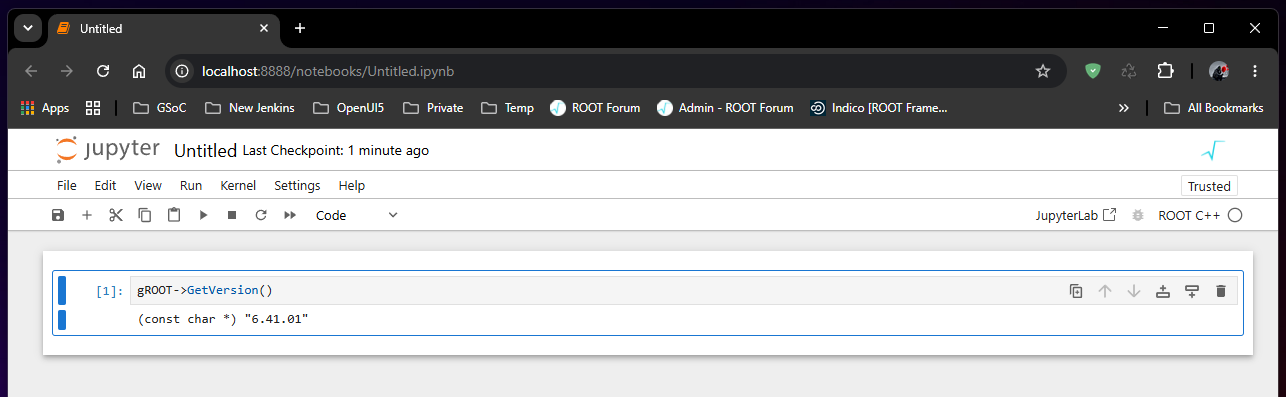
Hi, I just learnt about CERN ROOT. My question is, can I use it with C++ in Jupyther notebooks on Windows?
Thank you
Johan
Hi, I just learnt about CERN ROOT. My question is, can I use it with C++ in Jupyther notebooks on Windows?
Thank you
Johan
Hello,
I believe you can, but I’ll call on the expertise of @bellenot here.
Yest it works. But note that you may have to build ROOT from source…
@bellenot As I understand it ROOT uses Xeus and Cling and these do not work in Jupyther notebooks on Windows. How come it does work?
I don’t know about Xeus, but root --notebook on Windows works
@bellenot Where can I find more detailed instructions?
Build ROOT from source, as described here:
With Python and notebook installed, then just start root --notebook:
C:\root-dev\build\x64\relwithdebinfo>root --notebook

C:\root-dev\build\x64\relwithdebinfo>[I 2026-07-21 10:55:41.519 ServerApp] jupyter_lsp | extension was successfully linked.
[I 2026-07-21 10:55:41.530 ServerApp] jupyter_server_terminals | extension was successfully linked.
[I 2026-07-21 10:55:41.538 ServerApp] jupyterlab | extension was successfully linked.
[W 2026-07-21 10:55:41.542 JupyterNotebookApp] 'extra_static_paths' was found in both NotebookApp and ServerApp. This is likely a recent change. This config will only be set in NotebookApp. Please check if you should also config these traits in ServerApp for your purpose.
[I 2026-07-21 10:55:41.546 ServerApp] notebook | extension was successfully linked.
[I 2026-07-21 10:55:42.980 ServerApp] notebook_shim | extension was successfully linked.
[I 2026-07-21 10:55:43.093 ServerApp] notebook_shim | extension was successfully loaded.
[I 2026-07-21 10:55:43.096 ServerApp] jupyter_lsp | extension was successfully loaded.
[I 2026-07-21 10:55:43.098 ServerApp] jupyter_server_terminals | extension was successfully loaded.
[I 2026-07-21 10:55:43.107 LabApp] JupyterLab extension loaded from C:\Python314\Lib\site-packages\jupyterlab
[I 2026-07-21 10:55:43.107 LabApp] JupyterLab application directory is C:\Python314\share\jupyter\lab
[I 2026-07-21 10:55:43.108 LabApp] Extension Manager is 'pypi'.
[I 2026-07-21 10:55:43.288 ServerApp] jupyterlab | extension was successfully loaded.
[I 2026-07-21 10:55:43.296 ServerApp] notebook | extension was successfully loaded.
[I 2026-07-21 10:55:43.299 ServerApp] Serving notebooks from local directory: C:\root-dev\build\x64\relwithdebinfo
[I 2026-07-21 10:55:43.300 ServerApp] Jupyter Server 2.20.0 is running at:
[I 2026-07-21 10:55:43.301 ServerApp] http://localhost:8888/tree?token=85d0e8c1b0cba019dad9698e74fa4e02d932f7aec2fa1bf6
[I 2026-07-21 10:55:43.304 ServerApp]     http://127.0.0.1:8888/tree?token=85d0e8c1b0cba019dad9698e74fa4e02d932f7aec2fa1bf6
[I 2026-07-21 10:55:43.306 ServerApp] Use Control-C to stop this server and shut down all kernels (twice to skip confirmation).
[C 2026-07-21 10:55:43.381 ServerApp]

    To access the server, open this file in a browser:
        file:/C:/Users/bellenot/AppData/Roaming/jupyter/runtime/jpserver-36756-open.html
    Or copy and paste one of these URLs:
        http://localhost:8888/tree?token=85d0e8c1b0cba019dad9698e74fa4e02d932f7aec2fa1bf6
        http://127.0.0.1:8888/tree?token=85d0e8c1b0cba019dad9698e74fa4e02d932f7aec2fa1bf6
@bellenot Are these instructions for plain Windows or for Windows + WSL?
Native Windows with Visual Studio. No WSL. But note that you can also use WSL if you want…
I prefer not to use WSL. This sounds great!! I will try it out!
I tried to build ROOT from sources but I ran into difficulties with 3rd party libraries.
I have Visual Studio 2022 and the vcpkg package manager installed. I downloaded and extracted root_v6.40.02.source.tar.gz. Then I ran the command
cmake -G “Visual Studio 17 2022” -A x64 -T host=x64 -DCMAKE_INSTALL_PREFIX=“C:/Root/root-6.40.02-install” -B “C:/Root/root-6.40.02-build” “C:/Root/root-6.40.02-source”
This resulted in several error messages like
-- Could NOT find ZLIB (missing: ZLIB_LIBRARY ZLIB_INCLUDE_DIR)
Then I cleaned the build cache and tried the command
cmake -G “Visual Studio 17 2022” -A x64 -T host=x64 -DCMAKE_TOOLCHAIN_FILE=“C:/Libraries/vcpkg/scripts/buildsystems/vcpkg.cmake” -DVCPKG_TARGET_TRIPLET=x64-windows -DCMAKE_INSTALL_PREFIX=“C:/Root/root-6.40.02-install” -B “C:/Root/root-6.40.02-build” “C:/Root/root-6.40.02-source”
with the additional the options
-DCMAKE_TOOLCHAIN_FILE=“C:/Libraries/vcpkg/scripts/buildsystems/vcpkg.cmake”
-DVCPKG_TARGET_TRIPLET=x64-windows
These tell CMake to get 3rd party libs from vcpkg. Now the 3rd party libs were found, but I got the strange error message
CMake Error at C:/Libraries/vcpkg/scripts/buildsystems/vcpkg.cmake:820 (if):
Maximum recursion depth of 1000 exceeded
Call Stack (most recent call first):
C:/Libraries/vcpkg/scripts/buildsystems/vcpkg.cmake:939 (_find_package)
C:/Libraries/vcpkg/scripts/buildsystems/vcpkg.cmake:939 (_find_package)
C:/Libraries/vcpkg/scripts/buildsystems/vcpkg.cmake:939 (_find_package)
C:/Libraries/vcpkg/scripts/buildsystems/vcpkg.cmake:939 (_find_package)
C:/Libraries/vcpkg/scripts/buildsystems/vcpkg.cmake:939 (_find_package)
C:/Libraries/vcpkg/scripts/buildsystems/vcpkg.cmake:939 (_find_package)
C:/Libraries/vcpkg/scripts/buildsystems/vcpkg.cmake:939 (_find_package)
C:/Libraries/vcpkg/scripts/buildsystems/vcpkg.cmake:939 (_find_package)
C:/Libraries/vcpkg/scripts/buildsystems/vcpkg.cmake:939 (_find_package)
C:/Libraries/vcpkg/scripts/buildsystems/vcpkg.cmake:939 (_find_package)
C:/Libraries/vcpkg/scripts/buildsystems/vcpkg.cmake:939 (_find_package)
C:/Libraries/vcpkg/scripts/buildsystems/vcpkg.cmake:939 (_find_package)
…
C:/Libraries/vcpkg/scripts/buildsystems/vcpkg.cmake:939 (_find_package)
cmake/modules/SearchInstalledSoftware.cmake:134 (_find_package)
cmake/modules/SearchInstalledSoftware.cmake:93 (find_package)
cmake/modules/SearchInstalledSoftware.cmake:177 (ROOT_FIND_REQUIRED_DEP)
CMakeLists.txt:134 (include)
I have attached complete build logs for both attempts. How do I proceed?
build-log-1.txt (6.9 KB)
build-log-2.txt (78.1 KB)
Don’t use DCMAKE_TOOLCHAIN_FILE and VCPKG_TARGET_TRIPLET. Try with:
cmake -G"Visual Studio 17 2022" -A x64 -Thost=x64 -Dbuiltin_freetype=ON -Dbuiltin_ftgl=ON -Dbuiltin_gif=ON -Dbuiltin_gl2ps=ON -Dbuiltin_jpeg=ON -Dbuiltin_png=ON -Dbuiltin_gtest=ON -Dbuiltin_lzma=ON -Dbuiltin_lz4=ON -Dbuiltin_pcre=ON -Dbuiltin_tiff=ON -Dbuiltin_unuran=ON -Dbuiltin_xxhash=ON -Dbuiltin_zlib=ON -Dbuiltin_zstd=ON -DCMAKE_INSTALL_PREFIX=“C:/Root/root-6.40.02-install” -B “C:/Root/root-6.40.02-build” “C:/Root/root-6.40.02-source”
I tried this. Now I get the error
-- Building Cling as part of ROOT
– Cling version (from VERSION file): ROOT_1.4~dev
– Distributed RDataFrame enabled
CMake Error at CMakeLists.txt:607 (if):
if given arguments:“(” “var” “MATCHES” “_(LIBRARIES|LIBRARY|INCLUDE|VERSION)” “)” “AND” “(” “NOT” “C:/Root/root-6.40.02-source/interpreter/llvm-project/clang/include” “C:/Root/root-6.40.02-build/interpreter/llvm-project/llvm/tools/clang//include” “STREQUAL” “” “)” “AND” “(” “NOT” “CLANG_INCLUDE_DIRS” “MATCHES” “NOTFOUND” “)”
Unknown arguments specified
I have attached the build log.
build-log-3.txt (7.8 KB)
Did you start with a fresh build?
Which version of CMake are you using?
I may have forgotten to do a clean build.
I use CMake version 4.4.0
When I ran the command again I got the error message
CMake Error at C:/Program Files/CMake/share/cmake-4.4/Modules/FindPackageHandleStandardArgs.cmake:290 (message):
Could NOT find Python3 (missing: Python3_EXECUTABLE Interpreter) (Required
is at least version “3.0”)
So I added
-DPython3_EXECUTABLE=C:\Users\johan\miniconda3\python.exe
to the command:
cmake -G"Visual Studio 17 2022" -A x64 -Thost=x64 -Dbuiltin_freetype=ON -Dbuiltin_ftgl=ON -Dbuiltin_gif=ON -Dbuiltin_gl2ps=ON -Dbuiltin_jpeg=ON -Dbuiltin_png=ON -Dbuiltin_gtest=ON -Dbuiltin_lzma=ON -Dbuiltin_lz4=ON -Dbuiltin_pcre=ON -Dbuiltin_tiff=ON -Dbuiltin_unuran=ON -Dbuiltin_xxhash=ON -Dbuiltin_zlib=ON -Dbuiltin_zstd=ON -DPython3_EXECUTABLE=C:\Users\johan\miniconda3\python.exe -DCMAKE_INSTALL_PREFIX=C:/Root/root-6.40.02-install -B C:/Root/root-6.40.02-build C:/Root/root-6.40.02-source
I’m using Python 3.11. Now I got the error message
CMake Error at CMakeLists.txt:607 (if):
if given arguments:“(” “var” “MATCHES” “_(LIBRARIES|LIBRARY|INCLUDE|VERSION)” “)” “AND” “(” “NOT” “C:/Root/root-6.40.02-source/interpreter/llvm-project/clang/include” “C:/Root/root-6.40.02-build/interpreter/llvm-project/llvm/tools/clang//include” “STREQUAL” “” “)” “AND” “(” “NOT” “CLANG_INCLUDE_DIRS” “MATCHES” “NOTFOUND” “)”
Unknown arguments specified
I have attached the build logs
build-log-4.txt (8.4 KB)
build-log-5.txt (12.3 KB)
Never seen such errors…
Where do you start from? If it’s not already the case, can you start from a clean Developer Command Prompt for VS 2022?
I have started from a clean Windows Command Prompt. So now I tried with a clean Developer Command Prompt for VS 2022 instead. I got the same error; see the attached build log.
build-log-6.txt (12.5 KB)
So I did exactly what you’ve done, the only difference is that I have Python installed on my system in C:\Python314, and C:\Python314\Scripts\;C:\Python314\ are in the PATH. See the output log:
configure-log.txt (13.3 KB)
And BTW, if you want to use the notebook, you’ll need to pip install notebook
I ran CMake again with --trace. That told me that the error is in C:\Root\root-6.40.02-source\CMakeLists.txt line 607. Then I asked Gemini if the code block is correct. Gemini told me that the code is wrong and proposed a corrected version. I tested the corrected version, with Python in C:/Users/johan/miniconda3, and now it seems to work. I have attached Gemini’s answer.
Gemini_answer.txt (2.7 KB)
OK, that’s weird… Anyway, if it works for you, then just go on, I’ll try to understand the error and the Gemini answer